
One of the things I’ve been eager to do with my shifting focus is to make certain aspects of 3D modeling more accessible to modelers. Including, for starters, me.
In my experience, there are a ton of tutorials and step-by-steps out there, but so many of them are aimed at animators, or video game designers, or other concerns that don’t necessarily overlap with what I need from an application.
There’s also the reality that each app is its own world. Fusion is nothing like Blender is nothing like Rhino is nothing like Plasticity, and so on. Each has its own internal logic, and just because you more or less understand one, doesn’t mean you’ll understand the others. They’re also so feature-dense that understanding not only what everything is, but how to use it, is and endless task of discovery.
I have a pretty good handle on Fusion these days. But with Blender, I still feel like doing anything requires memorizing some carefully guarded incantation. Doesn’t help that there are approximately 13 million keyboard shortcuts.
But…as I learn my way around these, I’m planning to pass that learning on and hopefully bend the learning curve for others.
Size does matter
This particular problem starts in Fusion. When you something out of Fusion to an STL, the default export options will turn your smooth curves into faceted, many-sided polygons that show up in your 3D prints.
For example, here’s a 1/48 LAU-131 in Fusion:

And here’s the exported STL in Lychee:

To get around this, I’ve been pushing the export settings to 11. And that works. The problem is that it leads to some prohibitively large file sizes. Large like…a single 1/35 track link being 500MB.
You try copying a couple of those out to batch print, and all of the sudden you’re looking at a file that’s measured in gigs, and that chokes out whatever app you try to open it with.
While a somewhat less extreme example, let’s take a look at this 1/32 TBD Devastator instrument panel. Saved out of Fusion, it’s already nearly 200MB:

Looking at the Blender statistics, it’s easy to see why. This relatively simple piece has a whopping 3.7 MILLION TRIANGLES.
This is all a long-winded way to get to the problem. In order to get acceptable-quality STLs out of Fusion, I have to contend with huge file sizes.
Enter decimation
When I think of decimation, I think of the Roman legions.

This isn’t that.
Blender has these things called modifiers that you can apply to objects to, uh, modify them. And they do pretty much anything. You can assign materials, make things act like fabric, make copies of things, combine things, shrinkwrap things, and so on. Every time I play with these I feel like a dog trying to use a computer.
One of the modifiers is Decimate. And what it does is decimate the number of triangles in an object. Which in turn, decreases the file size.

The ratio starts at 1.0, and you can take it down pretty much as far as you want. I’ve found for most things, I can dip all the way to 0.05 without making any real difference to the appearance.
What does 0.05 mean? Basically that you’re removing 95% of the triangles in the object, and collapsing down to just the remaining 5%.
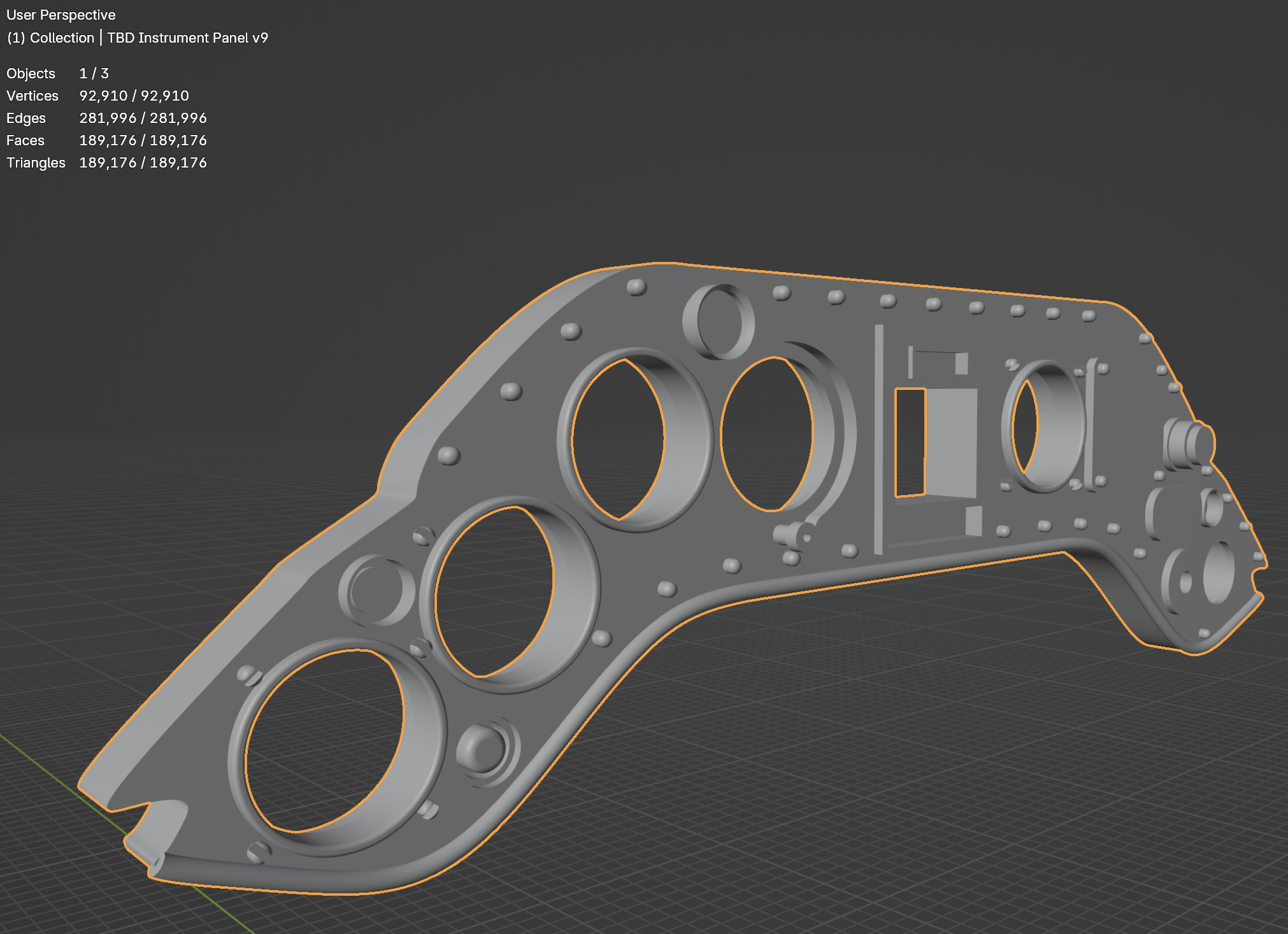
Look at that. The 3.7 million-triangle panel is now a far more manageable 189,000. And the file size dropped from 189MB to just 9.5MB.

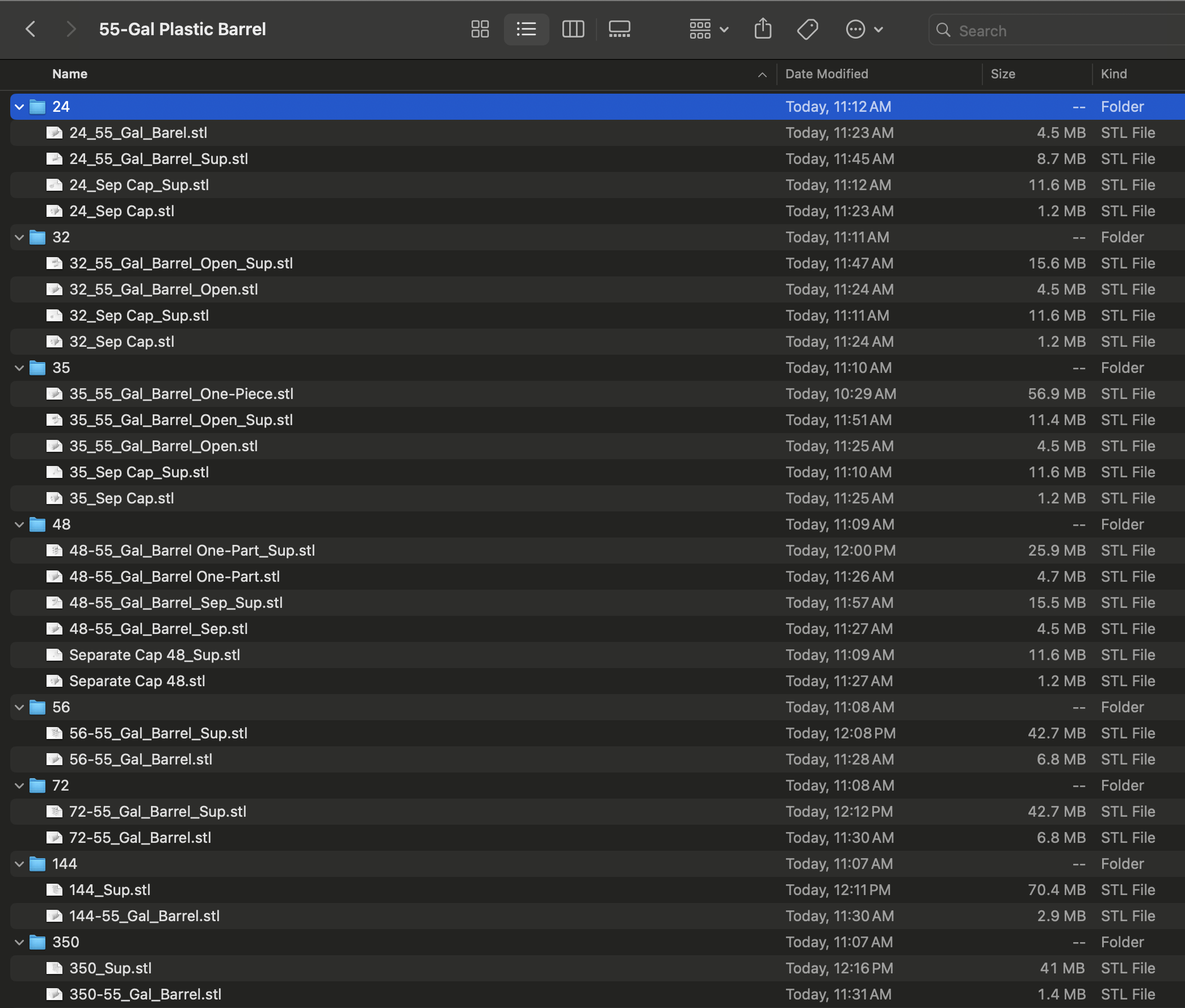
You can see similar results from these 55-gallon plastic barrels in various scales. Most of them dropped to a tenth their original size after going through decimation. And a lot of the supported ones that don’t seem like they dropped all that much? That’s because those supported files now include multiples of the barrel.

I’m sure there’s some much more elegant way to do this. If nothing else, with geometry nodes in Blender. But for now, I’m just happy that I have a way to get to high-quality STLs at reasonable file sizes.
Interesting. Just got a 3d printer a couple of weeks ago and find your new direction very timely. Looking forward to what is to come.
That was an eye opening and very helpful post. I have a printer and honestly am a bit intimidated by how to even begin. I’ve looked Fusion, that’s all. My goal is to print my own rather than buying someone else’s product. I know it’s not cost effective I’m from a time perspective, but the confidence and learning behind the effort are priceless.
Very interesting and helpful, I still use the default settings in Fusion, my belief was that the pixelation (or “voxelation” if that exists) induced by the slicer would override the faceted effect. Have you noticed if this approach also improved the quality of the sliced file, and in what way?
By the way, I have the files of your LAU-10/131 and assume they are before this technique.
Thanks for sharing
Too bad it appears Fusion doesn’t have a deviation setting to reduce STL size. I use SolidWorks and CATIA, and you can tell the software how much the mesh is allowed to deviate from perfection. On hard surface geometry it normally reduces file size by 10X for equivalent quality. And you can set the deviation to a small fraction of the voxel size and rest assured you won’t see any tesselation artifacts on the print.
It does as part of the export settings, but it’s clunky and the smaller standard deviations you have to go with to get rid of the tesselation can lead to stupid large file sizes, especially on anything with any complexity.
I would recommend exporting a .stp (or .step) from Fusion and importing the .stp into your slicer or Blender. .stp is a CAD-agnostic industry standard file type used for file exchange of models. More importantly, it is not a tesselated mesh but it defines the geometric features of the model. Cylinders are cylinders and cubes are cubes but it in a much smaller file because something like a cylinder can be defined with the geometric data for 3 faces (end caps and wall) without having to create all the intermediate geometry in your mesh. You can mesh it and convert it to an .stl in your slicer or Blender – I know PrusaSlicer can direct-import .stp files, so I suspect Lychee does too.
Hope that helps.
Blender doesn’t take STP natively, but there’s apparently a plugin that facilitates. Lychee doesn’t either, but looks like Chitubox does.
Definitely something to play with when I’ve got a bit more time on my hands.