

One of the things I love and hate about Blender is finding some feature somewhere that instantly solves a longstanding issue I’ve been having.
Today I want to show y’all the Array Modifier.
Making Lots of A Thing
In 3D modeling, it’s frequently necessary to make a lot of a thing. In Fusion, I make almost daily use of Rectangular Pattern, Circular Pattern, and Pattern on Path. They’re fantastic, especially when you graduate to using them on features, not just objects. There’s something very satisfying about patterning out a single extrusion into, like, 200.
As long as I’m in Fusion, that’s great.
But I vastly prefer doing my print supports in Lychee. And I’m increasingly taking files over to Blender for texturing and other purposes. This breaks workflows in some really aggravating ways.
Let’s play through two scenarios.
Scenario 1 – Track Link Replication

Okay. So here, I have a track link. And I need to have 90 of them for printing. With Fusion, I can Rectangular Pattern out a gaggle of 6×15 of them. Easy peasy.

But then I have to add supports to every single one in Lychee.
Fuck that.
Or I have to add the supports in Fusion. Which I know Will Pattison loves to do, but I do not.
Catch 22 ensues.
Scenario 2 – Supported STL Replication
I have a supported STL that I want to make multiples of. What is it this time? How about Mark 13 torpedo screws?

Thing is…Fusion won’t pattern STLs. And nobody wants to copypasta a whole bunch of times.
What About Patterning in Lychee?
L. O. L.
Making copies of things in Lychee is problematic. If you make a bunch of copies and let it auto arrange, all your shit will be all over the place, willy-nilly style. And if you don’t let it, it dumps EVERY SINGLE ONE into the exact same spot, and you’re in for a lot of clicking and dragging.

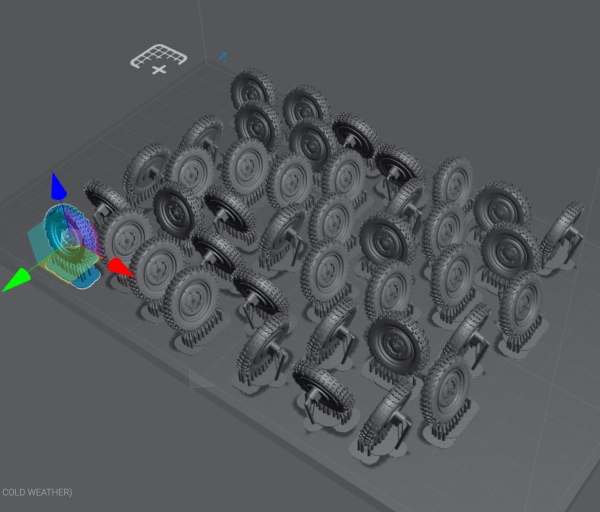
Yeah. Lychee copying is not it if you want something resembling a pattern.
Enter Blender and the Array Modifier
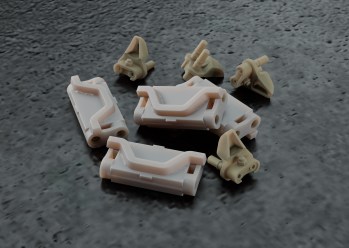
To explore the Array modifier, I’m going to use these worn 1/35 T16 track links. These were:
- Designed in Fusion
- Beat up and textured in Blender
- Supported in Lychee
- Exported back to Blender (as a six pack)
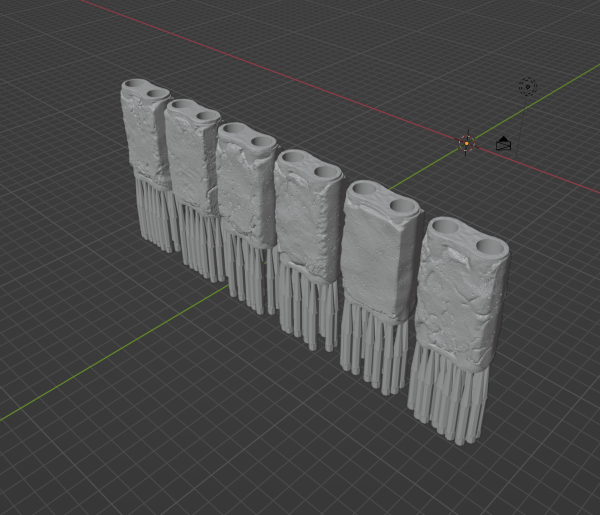
For Stuart tracks, I need at least 66 per side. 6 x 12 = 72, which leaves six extra links for good measure.
Over in the, uh, sidebar? File browser thing? I don’t know – every damn program calls this something different and I can’t keep them all straight. Anyway, Blender has a bunch of icons that cover different things. There’s one that’s all about textures. And one that’s for physics, etc. The blue wrench icon is where you can add modifiers to an object.
Array is one of the generative modifiers.
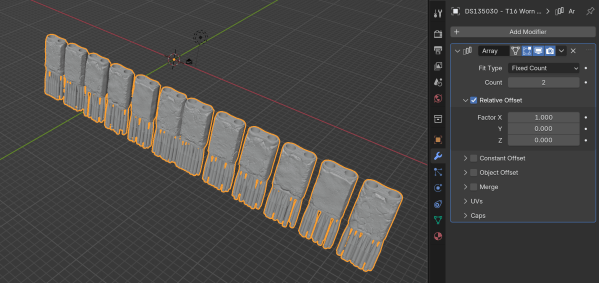
When it first loads up, if assumes you want to just have a bit of fun in the X-axis. But that’s not what I had in mind. So switch that X factor to zero, and instead give the Y-axis some rope. And change the count to 12 while we’re at it.

That factor of 1.0 is a bit scrunched though. So I’m going to space it out a bit more.
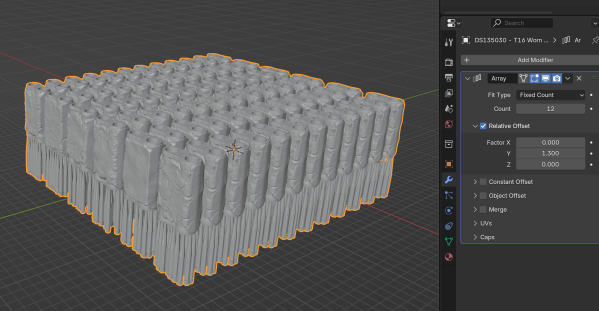
1.3 is a lot better.
At this point, I could easily just export the track block – Blender lets you apply modifiers on export. Or if I were working with a single object, I would do one array in the X axis, and then add another array for Y (if you try to do them at the same time, you end up in an echelon situation, which is cool, but not for these purposes).
That’s It?
Is this groundbreaking stuff? Not really at all, no. But it’s proven very useful and has saved me a ton of time, particularly with tracks, end connectors, and other things requiring multitudes.
And I learned awhile back if I find something pleasantly surprising and useful, someone else will, too. So…passing it along.


![Read more about the article Why Is My Print [Insert Color]?!?!](https://doogsstudios.com/wp-content/uploads/2025/11/Header-Why-is-My-Print-A-Color-350x263.jpg)
Doog, when are you going to get back to P-47 D razorback wheels?
At some point! Definitely before the Kotare Razorback shows up, I’ll tell you that much!
Major issue is that I need to focus on which tire patterns I want to focus on. And my brain doesn’t like that (it wants to do them all).
I have an Elegoo Mars sitting in storage. I had looked at Fusion, but honestly, the process looks intimidating. Any tips for a beginner? I’ve followed you for some time, I think my introduction was on an 1/32 Italeri F104 through your transition to this. TiA
This is a great solution. I will need to give this a try